Baby Daybook - Newborn Tracker
- 4.7
- Rating
- 1.00M
- Installs
- Free
- Price

 Analysis by App-foxy
When a baby arrives, the difficult part is often not knowing what happened, but remembering it while tired, interrupted, and carrying out several tasks at once. Baby Daybook turns those small moments into a readable record: sleep, feeding, diapers, and growth can all be logged in one parenting app, while its sleep predictions try to make the next rest period easier to anticipate. After using it as a practical newborn tracker, I found its main value less about collecting impressive charts and more about reducing the mental effort of remembering routine details.
That makes it a useful companion for parents who want a shared, structured view of the day without building their own spreadsheet. It is free to start, suitable for Everyone, and developed by Baltapis. The app has been available since May 4, 2014, and its broad audience is reflected in over a million installs, a 4.8 average from around 67 thousand ratings, and roughly 7.4 thousand written reviews. Those figures suggest a mature parenting tool rather than a short-lived novelty, although popularity alone does not make every part of it equally useful for every family.
How Baby Daybook fits into real newborn life
I find the most useful way to judge a newborn tracker is to ask whether it makes handoffs and daily decisions clearer without turning care into constant data entry. Baby Daybook is worth considering when sleep, feeding, diaper, and growth notes need to stay together, especially across caregivers. In the next section, I’ll look at what its focused approach does particularly well—and why its predictions are best treated as flexible planning cues.
You May Also Like

 Blood Strike: 2.5 Anniversary
Blood Strike’s Loadouts Turn Every Drop Into a Tactical Gamble
A close look at Blood Strike’s custom loadouts: how fast access to signature weapons reshapes its battle royale rhythm, rewards preparation, and narrows the gap between fights.

 Pandora - Music & Podcasts
Pandora’s Music Is Easy to Start, but Harder to Recover
Pandora’s strength is its low-effort path from a seed to a station. Its weak spot is how much confidence it asks you to place in connection, setup, and quiet recovery.

 8 Ball Pool
 Is Built on Rivalries, Rematches, and Routine
A close look at the rivalries, rematches, shared routines, and unanswered safety questions that turn a quick pool match into a persistent mobile community.

 Samsung Music
’s Quiet Strength Is Playing What You Already Own
Its reach comes less from spectacle than from dependable access to a personal library. That simplicity is both the app’s strongest retention engine and its ceiling.

 AccuWeather: Weather Radar
AccuWeather Review: A Quick, Clear Forecast for Everyday Decisions
For everyday plans, the best forecast is the one you can understand quickly. AccuWeather makes rain timing, radar, and local conditions easy to act on, with a few trade-offs.

 Hill Climb Racing
Why Hill Climb Racing Still Turns Crashes Into One More Run
A tiny car, a bumpy hill and one more upgrade: Hill Climb Racing keeps resurfacing because its simple chaos makes every near-miss feel personal.
More From Our News Desk
View All News


A quick record is more useful than a perfect diary
The most convincing reason to use this app is that newborn care is repetitive but not predictable. A parent may remember that the baby slept “recently,” fed “a few times,” or had a wet diaper “earlier,” yet those vague impressions are hard to use when deciding what to do next. A dedicated log gives those observations a place to go. Instead of relying on memory, I can check the day’s pattern and make a calmer decision based on what has actually been entered.
The basic categories are well chosen for that purpose. Sleep helps reveal whether a difficult afternoon followed a short rest. Feeding records can make it easier to discuss the baby’s routine with another caregiver. Diaper entries provide a simple running picture of output, and growth tracking keeps longer-term changes separate from the noise of an ordinary day. The app does not need to turn every moment into a detailed report to be helpful; its strength is putting the most frequently discussed newborn information together.
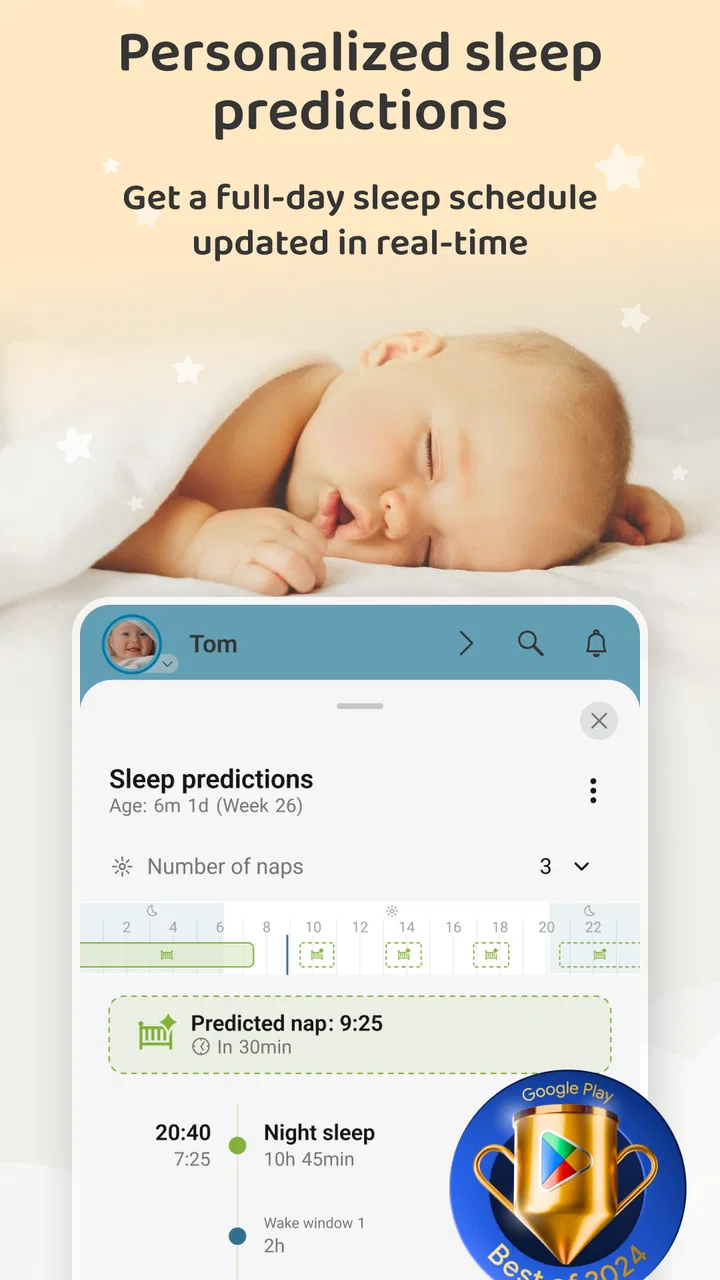
I also like the distinction between recording an event and interpreting it. Logging is something I can do immediately, even when I am too tired to think about patterns. The sleep prediction feature serves a different purpose: it attempts to turn previous rest information into a practical expectation for the next sleep period. That can guide planning, but I would treat it as a prompt rather than a promise. Babies do not follow a timetable simply because an app suggests one.
The value appears when more than one adult is caring for the baby
A notebook can work well when one person is responsible for every entry. In many households, however, care is divided between partners, relatives, or a babysitter. That is where a digital tracker becomes more than a personal memory aid. A parent returning to the room after a short break can look at the record instead of asking several questions, while the next caregiver can understand what has already happened during the day.
This shared context is especially useful after a broken night. If I have just woken up and cannot remember whether the baby fed before falling asleep, a visible log is more reliable than trying to reconstruct the sequence. The same applies when one parent handles mornings and another takes over later. The app can become a common reference point, provided everyone agrees to enter events consistently.
There is a practical trade-off here: a shared record is only as accurate as the people using it. If one caregiver logs every feeding and another records only some of them, the resulting pattern can look more meaningful than it really is. My advice is to decide together which events deserve an entry and how much detail is worth the effort. For many families, a quick, consistent record is better than a beautifully detailed diary that nobody maintains after a tiring week.
Sleep predictions are best used for planning, not pressure
The personalized sleep element is the feature most likely to distinguish this app from a plain notes application. It gives the day’s sleep history a practical purpose: instead of merely looking backward, I can use the recorded pattern to prepare for what may come next. That might mean starting a quiet routine, finishing a feeding, or avoiding an unnecessary outing when the baby is likely to become tired.
Still, predictions can create the wrong kind of pressure if they are treated as schedules. Newborn sleep changes quickly, and a missed prediction does not mean the parent entered something incorrectly or handled the routine badly. I would use the forecast as one signal among several, alongside the baby’s behavior and the family’s own experience. The useful question is not “Why did the baby fail to sleep at the predicted time?” but “Does this suggestion help me prepare a little earlier?”
That distinction is an important strength of the app’s design when approached sensibly. It encourages observation without requiring a rigid timetable. Parents who enjoy seeing patterns may find the predictions reassuring. Parents who already feel anxious about sleep may prefer to keep the feature in the background and use the tracker only as a record.
Growth tracking adds a longer view to short, exhausting days
Sleep and feeding entries are immediate; growth is different. It gives parents a way to keep selected measurements and observations connected to the same child profile rather than scattered across paper notes, messages, and appointment reminders. I find that separation helpful because it prevents a single difficult day from dominating the whole picture.
At the same time, growth information should not be treated as a substitute for professional guidance. A tracker can organize what a parent has observed or measured, but it cannot explain every change or decide whether a result is medically important. The best use is to make questions easier to remember and conversations easier to support. If something seems concerning, the appropriate next step is a healthcare professional, not repeatedly refreshing an app.
Where the app saves time, and where it asks for discipline
Baby Daybook works best during transitions. After a feeding, I can record the event before moving on to the next task. After a nap, the sleep entry can help keep the day’s sequence intact. At the end of the day, the record provides a more dependable summary than a tired parent’s memory. These small moments are not dramatic, but they are exactly where a newborn tracker earns its place.
The friction is that logging still requires attention. An app cannot know every event unless the caregiver records it, and busy parents will sometimes forget. That means the tool is not a passive monitor. It is closer to a lightweight journal with pattern support. People who dislike entering routine information may abandon it, while people who already keep notes will probably appreciate having a more focused home for them.
There is also a risk of over-recording. If every tiny variation becomes an item to analyze, the app can add work instead of removing it. I recommend starting with the categories that answer your real questions. If sleep is the current challenge, prioritize sleep and the events that seem connected to it. If several caregivers need coordination, focus on entries that prevent confusion. The app becomes more sustainable when the record serves the family rather than the other way around.
How it compares with notebooks, phone notes, and broader trackers
A paper notebook remains a strong alternative because it is immediate, flexible, and free from screens. It can be opened with one hand and filled with shorthand that matches a family’s habits. Its weakness is organization: finding a pattern across many pages or sharing the latest information with another caregiver takes more effort. Baby Daybook’s advantage is the structured nature of its categories and the way sleep information can lead to predictions rather than staying as isolated notes.
Generic phone notes are similarly flexible but usually require the parent to invent a format. One person may write “fed, nap, diaper,” while another records times in a completely different order. That is acceptable for occasional reminders, but less useful when the goal is to understand a routine over time. This app is the better choice when repeatable entries and a dedicated baby record matter more than unlimited customization.
Some parents may prefer a broader family-management app that combines tracking with calendars, shopping lists, appointments, or household tasks. That can be more convenient if the main goal is managing the entire family in one place. Baby Daybook has a narrower identity, which is also its benefit: its attention stays on newborn care rather than trying to become a general household dashboard.
The choice comes down to the kind of effort a parent wants to make. A notebook asks for handwriting and manual interpretation. A general notes app asks the parent to create a system. A wider family app may offer more areas but less focus. Baby Daybook sits between those options by offering a dedicated structure and sleep-oriented interpretation without requiring the user to build the framework from scratch.
Who should use it, and who may be happier elsewhere
I would recommend it most strongly to first-time parents who want a simple way to see what has happened during a confusing day, and to households where care is shared. It is also a good fit for parents who like spotting patterns but do not want to maintain a spreadsheet. The free starting point makes it easy to test whether regular logging actually reduces stress before deciding whether the additional paid elements are worthwhile.
It may be less suitable for someone who wants a completely passive system, highly specialized medical monitoring, or a full family organizer. It is also not ideal for a parent who finds sleep predictions emotionally unhelpful. In that case, the logging categories may still be valuable, but the predictive side should not become another source of comparison or worry.
The app is free, with in-app purchases ranging from $1.99 to $99.99 per item. That wide range means I would look carefully at what a purchase adds and whether it solves a problem I actually have, rather than assuming every extra option is necessary. The free experience is the sensible place to begin. A tracker should earn a place in the daily routine before a parent spends money on expanded functionality.
A realistic day with the tracker
Imagine a parent who begins the morning after several interrupted wake-ups. The baby fed before dawn, slept again, woke during breakfast, and then had a short nap that ended sooner than expected. Without a record, the morning can feel like one continuous blur. With entries made at each natural pause, the parent can review the sequence, notice that the last sleep was brief, and use the next prediction as a planning hint rather than waiting until the baby is already overtired.
Later, a partner takes over while the first parent showers. Instead of receiving a rushed verbal handover, the partner checks the recent events, adds the next feeding, and continues the same record. In the evening, the family can look back at the day without needing to remember every detail. That does not solve the baby’s sleep or make care effortless, but it removes a small amount of uncertainty at exactly the time when small reductions in mental load matter.
Another useful workflow is to review patterns only once or twice a day. Constantly checking the app can become distracting, especially when the baby needs attention. A quick entry after an event and a short review before a transition are usually more practical than turning the tracker into a live control panel. This approach preserves the app’s usefulness while keeping the baby, not the screen, at the center of care.
Small habits that make the record more reliable
First, I would log immediately after an event whenever possible, even if the entry is brief. Delaying several items until later invites mix-ups between similar feedings and naps. Second, I would agree on a shared shorthand or routine with anyone else who uses the record. Consistency matters more than detail because a pattern built from partial entries can mislead.
Third, I would use the sleep prediction to prepare rather than judge. If it suggests that rest may be approaching, begin the usual calming steps and remain flexible. Fourth, I would review the record before a pediatric appointment so that questions are based on actual observations rather than a vague impression of how the week felt. The app cannot replace clinical advice, but it can help a parent explain the routine more clearly.
Finally, I would periodically remove unnecessary effort from the routine. If recording a category no longer helps answer a question, stop prioritizing it. The best newborn tracker is not the one with the most complete history; it is the one a tired family can continue using. That is a meaningful trade-off, and Baby Daybook benefits when the parent treats it as support rather than an obligation.
My verdict after looking past the feature list
Baby Daybook succeeds because it addresses a specific problem: newborn care creates many small facts, and tired parents need those facts to remain usable. Its combination of sleep, feeding, diaper, and growth records creates a coherent daily picture, while personalized sleep predictions add a forward-looking element that ordinary notes cannot provide. The strongest experience comes from shared caregiving, consistent short entries, and a flexible attitude toward predictions.
Its limitations are equally clear. It depends on manual logging, and its predictions should never be mistaken for fixed schedules or medical conclusions. Parents who dislike tracking, want a broad household-management system, or feel pressured by sleep forecasts may prefer a notebook, a general notes tool, or a different kind of family app. The in-app purchase range also makes it sensible to test the free option carefully before paying for extras.
For me, the app is most worthwhile when it replaces repeated questions and unreliable memory without demanding perfection. It is a focused parenting app from Baltapis, free to begin, rated for Everyone, and established enough to have attracted a large user base. My recommendation is simple: use Baby Daybook as a calm record and planning aid, not as a rulebook for your baby. In that role, it can make ordinary newborn days easier to understand and slightly easier to share.
FAQs for Baby Daybook - Newborn Tracker
01What features does Baby Daybook offer for tracking my baby's activities?
Baby Daybook provides a comprehensive suite of features to track your newborn's daily activities. These include logging feeding times, diaper changes, sleep patterns, and growth milestones. The app also offers detailed analytics and reminders, making it easier for parents to monitor their baby's development and establish a routine.
02Is Baby Daybook available on both Android and iOS platforms?
Yes, Baby Daybook is available for both Android and iOS devices. This ensures that parents can access and sync their baby's data across multiple devices, providing flexibility and convenience whether you're at home or on the go.
03Does Baby Daybook support multiple caregivers?
Absolutely. Baby Daybook allows multiple caregivers to access and log information, making it ideal for families or caregivers sharing responsibilities. This feature ensures that everyone is on the same page with the baby's schedule and needs, enhancing communication and coordination.
04How secure is my data in Baby Daybook?
Security is a priority for Baby Daybook. The app uses encryption to protect your data and offers options for cloud backup to ensure that your information is safe and retrievable. Users can feel confident that their baby's data is secure and private.
05Is there a cost associated with using Baby Daybook?
Baby Daybook offers a free version with essential features. However, there is a premium upgrade available that unlocks additional functionalities like advanced analytics and customization options. This allows users to choose a plan that best fits their needs and budget.
Pros
- Intuitive interface for easy navigation.
- Comprehensive tracking of baby’s activities.
- Supports multiple babies for busy parents.
- Customizable reminders for feeding and naps.
- Syncs data across multiple devices.
Cons
- Limited features in free version.
- Occasional sync delays reported by users.
- Some users find ads intrusive.
- No offline mode available.
- Certain features require premium upgrade.

Baby Daybook - Newborn Tracker
Gallery